Mobile STASH
On the road? In the audience? Mobile STASH to the rescue!
ShareTheBoard Secures Impact Awards at SXSW EDU 2026 and LTSMG 2026
First things first, let’s define terms: what is Board View?
Board View is a content-only, unobstructed, and fully interactive view of your shared surface. It’s how your viewers (be they remote or in-person) can see the clearest possible feed of content written on your board even have the option to interact with it. All your viewers need to see Board View is any Web browser – that’s it!
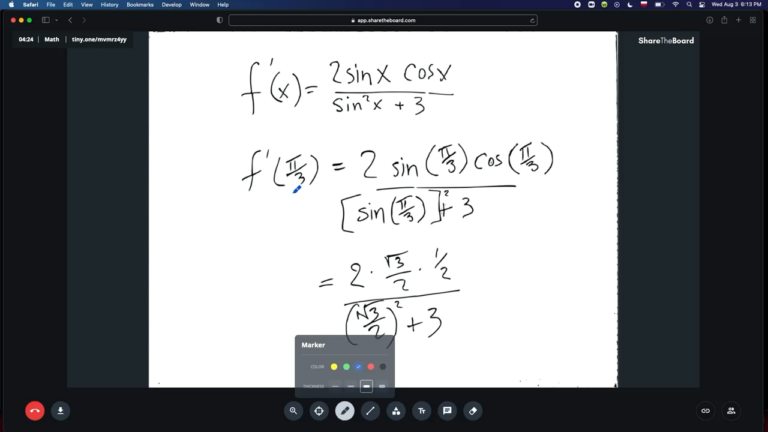
In Board View, your viewers see your board just like you see it - pure content, no obstructions. They can even interact with your board (if you, as the presenter, allow them to).
How do I share Board View with my viewers?
This part is super easy:
That’s it! If you’re sharing your board with a remote audience, consider pasting the URL into the chat box of your video conference. If you’re working with an in-person audience, you have a lot of options – read on for suggestions.
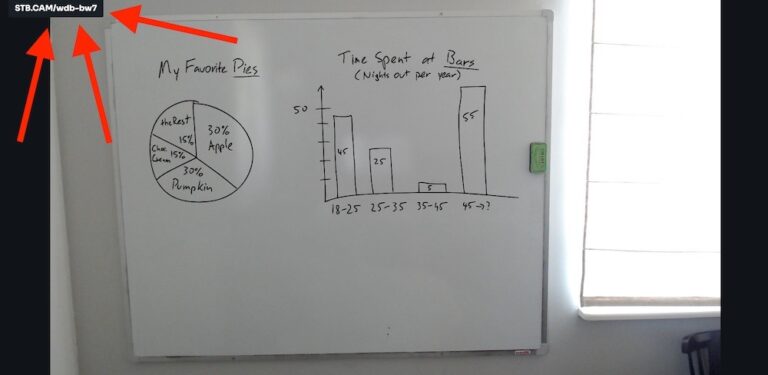
That link in the top-left: that's your session's unique URL. Paste it somewhere your viewers can see and - voila! - they get access to Board View!
Other ways to provide viewers access to Board View
Though sharing the short session-specific URL is very easy, sometimes there are even easier options to get folks into Board View:
So, what’s in Board View anyway?
As you can see from the video at the top of the article, Board View is first and foremost a clear, completely unobstructed view of your shared board. But there’s so much more:
Can I secure/control access to Board View?
Yes. You have multiple options to control who has access to Board View during your session:
So, what’s NOT inside Board View?
Remember that Board View is exactly what it sounds like: a live view of your board. This means that you won’t find any audio or video here.
If you’re working with a remote audience, you’re still going to use your video conferencing app of choice to communicate (you may also want to use Content Overlay instead of Board View). And if you’re working with an in-person audience, of course, no audio or video are needed!


